

IMEI Unlock Any Spark Phone
- Removes Carrier Blacklist
- Fixes Bad ESN & Bad IMEI
- Any iOS Model Supported
Is your phone not working with the Spark mobile network, and do you think it is blacklisted? Then you have come to the right place, as ESNDoctor will teach you how to identify a blacklisted device, what it looks like, and how to Spark IMEI unlock on your device with our online service. Discover the best tips and recommendations here so you can start your cleaning process right away for free, and also learn how to deal with this issue in the best possible way.
📚 Complete guide with step-by-step solutions ahead
What are the Spark carrier policies for blacklisted IMEIs?
The main policy you need to follow for these devices is to be the original owner of the device and provide specific details about your phone, like your security PIN, IMEI number, and phone number. Keep in mind, this process can take several days since they will need to verify everything before cleaning a reported IMEI. If you fail to comply with the data or estimated time, Spark reserves the right to deny the unlock and maintain the blacklist until you resolve any outstanding issues.
Besides the normal criteria, do I need something else?
Yes, besides the criteria mentioned above, to unlock mobile phones, you will also need to provide valid proof of purchase. This means that you will need to have a copy of the receipt with all your data to validate that the phone was purchased legitimately. If that's not possible, Spark won't continue with the process.
Why phones get blacklisted in New Zealand
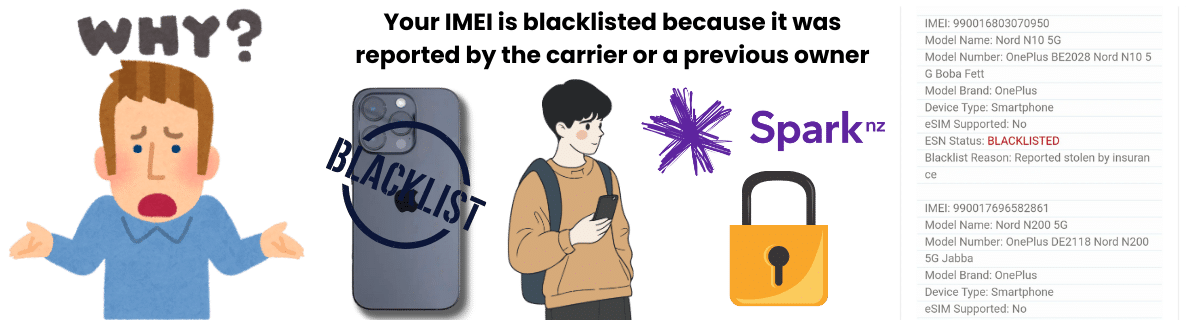
Managed by Telecommunications Carriers Forum (TCF)
A smartphone can be added to the list for different reasons. Since the blacklist in New Zealand is managed by the Telecommunications Carriers Forum (TCF), all mobile providers have the same reasons to lock phones. So, if you want to know why your device was locked, you can look out for any of the reasons listed above and confirm it with the help of IMEI checkers:
Reported lost or stolen
Unpaid bills or contract default
Fraud or identity theft
Imported with a blacklisted IMEI
Device reported by mistake
(not that common)
💡 All NZ carriers follow the same blacklisting criteria through the TCF database system
Does Spark have connections to the GSMA Global Blacklist?

Yes, Spark, besides participating in New Zealand's national IMEI blocklisting system, can also add NZ mobile phones to the GSMA blacklist. This system ensures that when a device is reported lost or stolen, it can be shared inside and outside the country with other network providers for registration and awareness purposes
Now, keep in mind that the TCF blacklist is not the same as the GSMA global blacklist. While the GSMA maintains an international database, there's no public confirmation that Spark automatically submits IMEIs to the global GSMA blacklist. Besides, some countries may not have this regulation, meaning your iPhone or Android device should still operate normally there, even if you have an active report.

Can the IMEI unlock change if I have a prepaid or postpaid?
Not really, as it only affects when you are trying to unlock a network-locked SIM card with an unlock code or other services. Other than that, the cleaning process to remove an IMEI from the reporting database is the same whether you have a prepaid or postpaid device.

To network unlock my Spark, do I need a clean IMEI?
That's correct; one of the main requirements to obtain a SIM network unlock PIN is that your device can't be blacklisted. Any type of report can affect the chances of changing to other carriers, so you will have to make sure to check the status of the device each time you try an unlock process.
Do all carriers like Spark have an independent blacklist database?

Not really, because unlike other countries, all lists or report records are shared through the TCF, meaning that Spark doesn't have an independent list. So basically, if you manage to get out of the reporting database, all that information will be shared with the rest of the providers (One NZ, 2degrees, etc.) after 48 hours. If it was reported to the international GSMA database, it can take a little longer to update, but it is still possible.
This will apply whether you used Spark to clean the device or online services like ESNDoctor. Just keep in mind that the whole process can take several hours to ensure everything is working, so if you don't see any changes yet, just wait for a confirmation message from your carrier or try to check your IMEI number later online.
⏰ Expected Timeline
48 hours for NZ carriers • Longer for international GSMA database
Why are some unlock services instant, and others aren't?
Some tools require manual verification or a step-by-step process, rather than operating automatically. The connection of the servers to the database can also be slow. On some occasions, it can cut out completely, making the user start all over again. The good thing is that this doesn't happen with ESNDoctor, as we are a reliable service that is always making sure all our customers have a great unlock experience.
ESNDoctor is the best instant alternative!
Now is a good time to use the Spark IMEI unlock service called ESNDoctor!
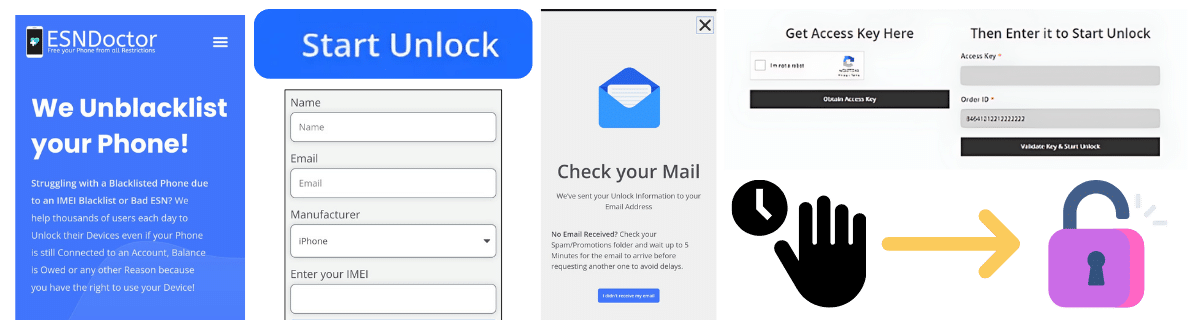
To unlock a Spark device from the reporting database, you can go to ESNDoctor and complete the following steps:
Please fill out the form on the screen with your name, email, phone brand (Samsung, iPhone), and the phone's IMEI.
Check your email to complete the registration process and get your access key.
Activate your order with the access key and wait for the servers to start.
The servers will automatically eliminate any report associated with your phone after a couple of minutes.
Restart the phone to reestablish the connection.
Yes, unlocking sometimes may be prohibited by law if the phone was obtained fraudulently, is blacklisted due to theft, or is still under a binding legal contract or finance agreement.
If your Spark SIM says “SIM Card Not Recognized” after cleaning the IMEI, it likely means the IMEI is still blacklisted or invalid. Make sure to provide the right information and IMEI code to avoid these issues.
Most online programs do the process automatically, meaning the user only has to wait. The same happens with the carrier, so unless you have specialized software to do it yourself, it is not really possible, as you will still need assistance.